- Shopify Basic costs $39 a month billed monthly or $29 a month billed yearly, with in-person card payments at 2.6% + 10 cents (Shopify pricing, September 2026).
- The strongest vending uses are office snack box subscriptions, break-room delivery, branded merch, and deposits or invoices for used machine and route sales.
- Shopify POS runs on a phone with a $49 Tap & Chip reader or Tap to Pay on iPhone, so the same catalog sells at events.
- For lead generation alone, a website builder is cheaper; many operators pair a main site with a small Shopify store.
- Test one product for 90 days before building a full store.
Shopify for vending operators is a side door most route owners never open: the same company that sells snacks from a machine can sell snack boxes, office delivery, branded merch, and even used machines online, then take card payments at events with the same account. As of September 2026, Shopify's Basic plan costs $39 a month billed monthly (or $29 a month billed yearly), and in-person card payments on Basic run 2.6% + 10¢, according to Shopify's own pricing pages.
Part of our complete guide: scale a vending machine business.
None of this replaces your machines. It adds a second till that is open at 2 a.m., takes preorders, and gives property managers and office admins a link they can pay from. This guide covers what a vending company can actually sell on Shopify, how to take deposits for placements or machine sales, how Shopify POS fits at events, the real costs, and who should skip it.
What Shopify costs a vending operator in 2026
These numbers come from Shopify's pricing page and Shopify's POS pricing page, checked on September 29, 2026. Prices change, so confirm them on the plan page before you budget.
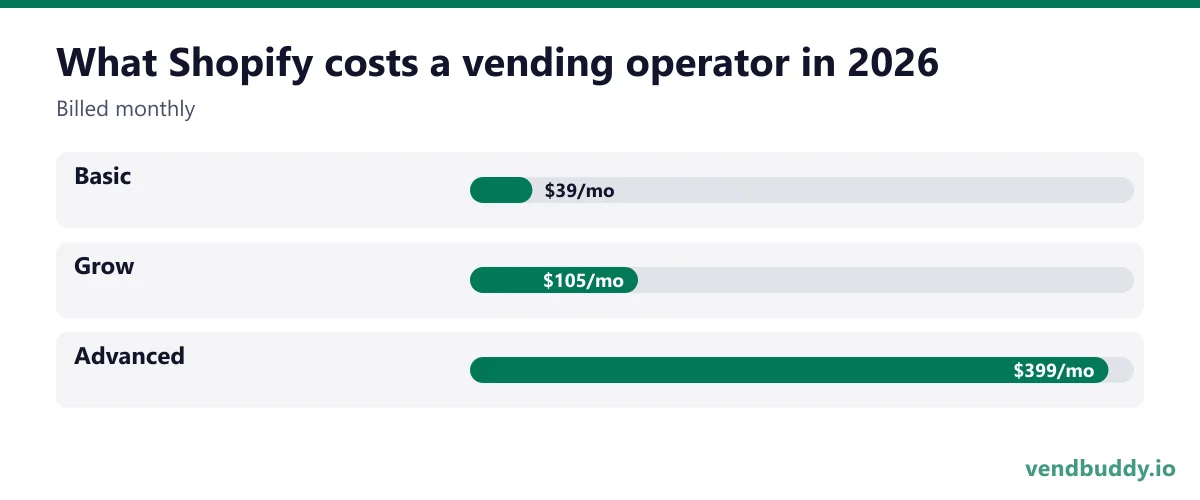
| Plan | Billed monthly | Billed yearly | Online card rate | In-person card rate |
|---|---|---|---|---|
| Basic | $39/mo | $29/mo | 2.9% + 30¢ | 2.6% + 10¢ |
| Grow | $105/mo | $79/mo | 2.7% + 30¢ | 2.5% + 10¢ |
| Advanced | $399/mo | $299/mo | 2.5% + 30¢ | 2.4% + 10¢ |
A few details matter for a small route. New accounts get a 3-day free trial, then $1 a month for the first 3 months on most plans. If you use a payment processor other than Shopify Payments, Shopify adds a third-party transaction fee (2% on Basic). Casual in-person selling at pop-ups and events is included on every plan; the $89-per-location POS Pro add-on is for staffed retail stores and most operators will never need it. Shopify's Tap & Chip card reader lists at $49 on its hardware store, and Tap to Pay on iPhone works through the free POS app with no reader at all.
For most vending operators, Basic is the whole answer. You can start a trial through Shopify's free trial page and cancel before the $1 months end if it does not earn its keep.
What a vending company can sell on Shopify
The products that work are the ones your locations already ask about. Four have come up again and again with operators we talk to:
- Office snack boxes. A monthly box of 40 to 60 items for a small office that is too small for a machine. You already buy the stock at club or distributor prices, so the box is mostly packing time. Sell it as a subscription so the revenue repeats.
- Break-room delivery. Some offices want a restock of their own shelf rather than a machine. A Shopify order form with delivery days and a minimum order handles that without a phone call every week.
- Branded merch. If your machines carry a brand (a themed candy route, a claw machine arcade, a Pokémon card machine), shirts and stickers sell to the same fans. Print-on-demand apps connect to Shopify so you never hold inventory.
- Party and event trays for the buildings you already serve, sold as a product with a pickup or delivery date.
The test for each one is simple: would a customer you already have pay for it with a card link? If you are guessing, skip it. A store with three products that sell beats a store with forty that don't.
Offices are the best starting point because the buyer is already in your contact list. If you have not placed a machine in an office yet, our guide on getting a vending machine into an office covers the pitch, and the office coffee service model shows how recurring break-room revenue is priced.
Picture the machines paying you while you sleep
That’s the real promise of vending — income that doesn’t cost you your time, and a life on your own terms. VendBuddy turns this guide into a step-by-step plan so you actually build it instead of just reading about it. Start free today.
Start building free →Taking deposits for placements and used machine sales
This is the use most operators miss. A lot of vending money moves as a big one-off payment: a used machine sale, a route sale, a custom machine wrap, a placement that needs a refundable deposit. Chasing that by Venmo or check is slow and looks amateur to a property manager.
Shopify gives you two clean ways to do it. The first is a draft order: you build the order in the admin (say, "Used combo machine, refurbished, $2,400") and email the customer an invoice they pay by card. The second is a fixed deposit product, such as a "$250 machine reservation deposit" that you mark as non-shippable and refund or credit later. Both leave a receipt and a record your accountant can read, which matters when the machine is a business asset.
If you sell used machines regularly, give each one a product page with photos, the model, the bill validator and card reader it has, and whether it is local pickup only. Buyers searching for used equipment want the same facts we list in how to buy a used vending machine, and when you sell a whole route the process in how to sell a vending machine business still applies. Shopify only handles the payment and the page.
One caution: card fees on a $2,400 sale are real. At 2.9% + 30¢ online, that is about $70. For big sales, many operators take a card deposit on Shopify and the balance by bank transfer.
Shopify POS at events and pop-ups
Farmers markets, sports tournaments, school fundraisers and company picnics are where a vending operator can sell by hand for a day. Shopify POS turns a phone into the register, and the products are the same catalog as your online store, so inventory counts stay in one place. Pay in person with a $49 reader or Tap to Pay on iPhone, and the sale shows up next to your online orders.
Most operators end up on Nayax for tap to pay because it is what the distributors already support. Their reader handles tap, chip and the telemetry feed in one box, and the monthly fee is the part to check against your per-machine volume before you commit the route to it. Affiliate link, so we may earn a commission at no extra cost to you.
Events also double as prospecting. The person buying a drink at a youth tournament often manages a gym or an office. Keep a "request a machine" card at the table that points to your website. We cover how operators use events to find placements in pop-up vending machine events, and the POS side in detail in Shopify POS for micro markets and pop-ups.
Shopify vs a regular website builder
Shopify is a store first and a website second. That is the trade-off. If your main goal is inbound leads from property managers ("request a machine," service areas, FAQs), a site builder such as Wix or an AI builder like Base44 is usually the better home, and our best website builder for a vending business comparison walks through that choice. Shopify can host those pages too, but you pay store prices for brochure features.
The sensible setup for many operators is one main site for lead generation plus a Shopify store (or a Shopify "Buy Button" on the main site) for things people pay for. If you want to start with the website side, read do vending machine businesses need a website first.
A website brings inbound demand. For outbound, the Lead Finder in VendBuddy pulls property manager and business contacts for the locations you want to pitch, so the two work together.
How Shopify works outside vending
The skills carry over. If you ever want a physical-product business that has nothing to do with machines, the same store handles it: candles, sauces, apparel, specialty snacks. Operators who already understand buying stock, pricing for margin and tracking what sells have a head start on most first-time store owners. An imported and exotic snack store is a natural next step, and we walk through sourcing and labeling in how to start an exotic snack business on Shopify.
What changes outside vending is traffic. A machine in a busy lobby sells to people who walk past it. An online store sells to nobody until you bring buyers to it through search, social posts, email or ads. Budget time for that before you budget money for inventory.
Who should skip Shopify
- Operators with one to three machines and no office customers. The monthly fee is small, but the time to run a store is not.
- Anyone who only needs a lead form. A site builder is cheaper for that job.
- Operators who want unattended self-checkout for a micro market. Shopify POS is built around a person running the checkout; dedicated micro market kiosks do that job.
If one of the uses above fits, the cheapest test is a single product (an office snack box or a machine deposit) on the Basic plan for 90 days. Track orders and hours. If it pays for its own fee plus your time, keep it. If you want to try that, start the Shopify trial and add one product before you add ten.
A one-weekend setup plan
- Pick one product your current customers already asked for.
- Open the store and pick a free theme. Write a plain product page that states the price, what is included, the delivery area and the lead time.
- Turn on Shopify Payments so you avoid the third-party fee, and set your sales tax settings for your state.
- Install the POS app on your phone and ring up a $1 test sale.
- Send the link to five existing customers and ask for honest feedback.
That is enough to know within a month whether a second revenue line is worth your evenings. Taxes on food and delivery vary by state, so check with your state revenue department or accountant before you sell prepared or bundled food.
Frequently Asked Questions
Is Shopify worth it for a small vending business?
Only if you have something people will pay for online, such as office snack boxes, delivery, merch or used machines. For a lead form alone, a website builder is cheaper. Test one product on the Basic plan for about 90 days and keep it only if it covers the fee and your time.
How much does Shopify cost in 2026?
As of September 2026, Shopify Basic is $39 a month billed monthly or $29 a month billed yearly, Grow is $105 or $79, and Advanced is $399 or $299. New accounts get a 3-day trial and then $1 a month for 3 months on most plans. Check the Shopify pricing page for current numbers.
Can I take a deposit for a vending machine sale on Shopify?
Yes. You can send a draft order invoice for the full amount or a deposit, or list a fixed deposit product that you credit or refund later. For large sales, some operators take a card deposit and the balance by bank transfer to reduce card fees.
Do I need POS Pro to sell at events?
No. Casual in-person selling at pop-ups and events is included on every Shopify plan. POS Pro, at $89 a month per location, adds staff and inventory tools for permanent retail stores.
What is selling, which buildings say yes, and the numbers before you buy a machine. Free, confirm from your inbox, unsubscribe in one click. Refer one friend and get 25 VendBuddy credits.
Walk-ins and cold emails find locations. A small site with your own machine photos and a request-a-machine form lets the next one find you. Around machine three to five, an AI builder drafts it in an evening. Wix is the mature site builder; Base44 also builds working tools like a quote form. Start with the AI website walkthrough or Wix vs Base44.
General information, not legal, tax or financial advice. Rules change, so check the official source. Revenue and income figures are examples, not promises. See our terms.