- Shopify Basic in-person card payments cost 2.6% + 10 cents; the Tap & Chip reader is $49 and Tap to Pay on iPhone needs no reader (Shopify, September 2026).
- Square's free plan charges 2.6% + 15 cents in person with no monthly fee, so it is cheaper if you only sell at events (Square fees page).
- Shopify makes sense when you already sell online and want one catalog for web and events.
- Shopify POS assumes a person at checkout; unattended micro markets need a dedicated kiosk, though a QR-code honor shelf works for small offices.
- Small tickets make the per-transaction fee the bigger cost, so bundle prices.
Shopify POS for micro markets and pop-ups works best when a person is at the table: a snack stand at a tournament, a holiday market booth, a staffed break-room shop. As of September 2026, in-person card payments on Shopify's Basic plan cost 2.6% + 10¢, the Tap & Chip reader is $49, and Square's comparable in-person rate is 2.6% + 15¢, according to each company's own pricing pages.
Part of our complete guide: how much does a vending machine cost.
An unattended honor store is a different problem, and this guide is honest about where Shopify POS fits and where it doesn't. Below: the hardware you need, what it costs, how the fees compare with Square, and setups for pop-up stands, events and honor shelves.
What Shopify POS costs in 2026
From Shopify's POS pricing page, checked September 29, 2026:
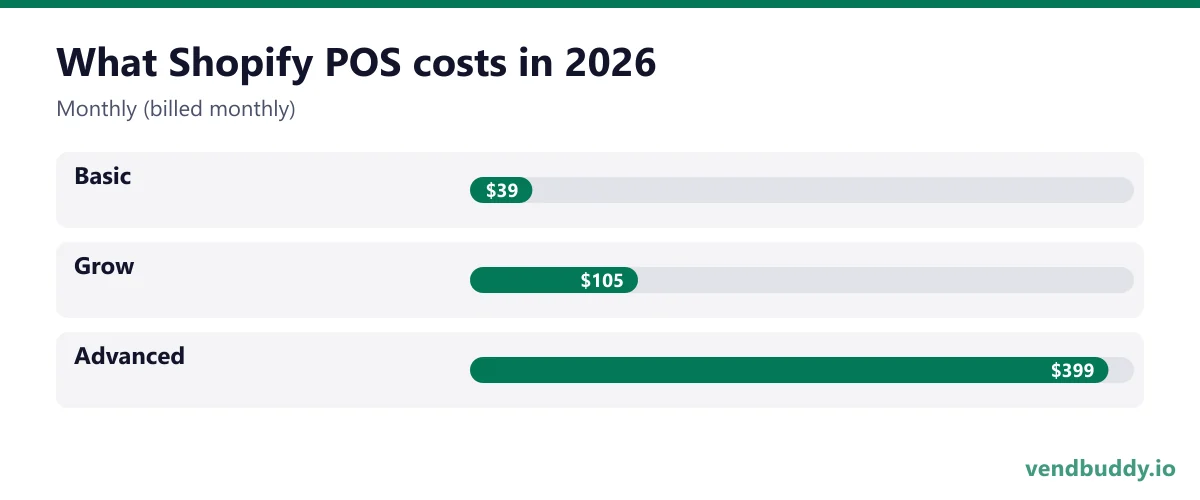
| Plan | Monthly (billed monthly) | In-person card rate | Online card rate |
|---|---|---|---|
| Basic | $39 | 2.6% + 10¢ | 2.9% + 30¢ |
| Grow | $105 | 2.5% + 10¢ | 2.7% + 30¢ |
| Advanced | $399 | 2.4% + 10¢ | 2.5% + 30¢ |
Paying yearly drops Basic to $29 a month. New accounts get 3 free days and then $1 a month for 3 months on most plans. Casual in-person selling at pop-ups and events is included on every plan. POS Pro is an $89-per-location monthly add-on with staff permissions and deeper inventory tools, meant for permanent stores. A weekend snack stand does not need it.
Hardware is separate. Shopify's hardware store lists the Tap & Chip Card Reader at $49 and the countertop POS Terminal at $349. You can also skip hardware completely with Tap to Pay on iPhone through the Shopify POS app, which takes contactless cards and phone wallets.
On tap to pay specifically, Nayax is the default for a dull reason: it is the one most machine suppliers pre-wire for. Price the monthly against your slowest machine, not your best one. Affiliate link, so we may earn a commission at no extra cost to you.
Hardware for a pop-up snack stand
Start with the phone you already own. For most stands, this kit covers it:
- A phone with the Shopify POS app and Tap to Pay turned on, for contactless cards and wallets.
- The $49 Tap & Chip reader if you expect chip cards or want a backup when your phone battery dips.
- A battery pack, because events rarely have outlets near the table.
- A cash box and a printed price sign. Plenty of event buyers still pay cash for a $2 drink.
Add a tablet stand and the $349 terminal only if you run a busy counter where a line forms and customers need a screen to tip or see the total. For a card table at a soccer tournament, a phone and a reader do the job.
Work out connectivity before the event. Shopify POS can take some payments offline, but limits apply, so check Shopify's help center for the current offline rules and test your cell signal at the venue if you can.
Picture the machines paying you while you sleep
That’s the real promise of vending — income that doesn’t cost you your time, and a life on your own terms. VendBuddy turns this guide into a step-by-step plan so you actually build it instead of just reading about it. Start free today.
Start building free →Shopify POS vs Square for pop-ups
Square is the obvious alternative and a good one. Here is how the numbers compare, from Square's fees page and Shopify's pricing page, September 2026:
| Shopify (Basic) | Square (Free plan) | |
|---|---|---|
| Monthly software fee | $39 ($29 yearly) | $0 |
| In-person card rate | 2.6% + 10¢ | 2.6% + 15¢ |
| Online card rate | 2.9% + 30¢ | 3.3% + 30¢ |
| Manually keyed card | 3.5% + 10¢ | 3.5% + 15¢ |
The difference that matters most is the monthly fee. If you only do a few events a year and sell nothing online, Square's free plan is cheaper. On a $3 drink, the 5-cent gap in per-transaction fees adds up to $50 over 1,000 sales, which is barely more than one month of Shopify Basic.
Shopify wins when you also sell online. If you already run a Shopify store (office snack boxes, merch, an exotic snack shop), the POS app uses the same catalog, inventory and customer list, so an event is just another sales channel. Square has online stores too, but if your web store is already on Shopify, running a second system for events means double data entry.
A fair rule: use Square if in-person events are the whole business; use Shopify if online sales are the main business and events are a side channel. We cover the online-first case in Shopify for vending operators.
Micro markets and honor stores: where Shopify POS fits
A real micro market is an unattended open-shelf store with a self-checkout kiosk, usually in a workplace with a large headcount. Shopify POS is built around a person ringing up the sale, so it does not replace a micro market kiosk. Operators running true unattended markets use dedicated kiosk systems. We compare the formats in micro markets vs vending machines and smart cooler vs micro market.
There is a lighter version that Shopify handles well: the honor shelf in a small office. Put a QR code on the shelf that links to a Shopify page with each item, and employees pay on their phones. It relies on trust and suits small teams where everyone knows each other. Shrink will be higher than with a kiosk, so price for it and count stock weekly.
Another hybrid is a staffed "market day": you set up a table in a large office's break room once a week for two hours and ring sales through POS. That tests demand for a full micro market before anyone buys a kiosk and coolers.
Running a profitable pop-up snack stand
- Pick events where people wait around: youth tournaments, swim meets, farmers markets, car shows.
- Ask the organizer about vendor fees and exclusivity. Some events already have a concession contract.
- Carry a short menu. Ten to fifteen items with round prices speed up the line.
- Load the catalog into POS with photos so ringing up is two taps.
- After the event, check the sales report and cut the bottom three items next time.
Food permits vary by city and county. Prepackaged snacks usually face lighter rules than anything you prepare, but many events still require a temporary food vendor permit. Ask the organizer and the local health department.
A stand also works as a prospecting table. The parent buying a sports drink may manage an office or a gym. Keep a sign that says you place machines, and follow up. Our pop-up vending machine events guide covers that angle.
What fees look like on a real weekend
Here is an illustrative example. A stand sells 300 items at an average of $2.50 on cards, for $750 in card sales. On Shopify Basic in person, fees are 2.6% of $750 ($19.50) plus 300 × 10¢ ($30), about $49.50. On Square's free plan, the same sales cost $19.50 plus 300 × 15¢ ($45), about $64.50. Small-ticket sales make the fixed per-transaction fee the bigger cost, which is why bundles ("any 3 for $6") help. For more on how per-swipe fees hit low-price items, see vending machine card reader fees.
Sales tax and records at events
Event sales are still taxable sales in most states, and prepackaged snacks and drinks are often taxed differently from groceries. Set the tax rate for the event location in your POS before the day starts, not after. Some states also want a temporary sales tax permit or an event-specific filing when you sell outside your home county, so check your state revenue department's page for temporary vendors.
The upside of running events through POS instead of a cash box alone is the paper trail. Every card sale lands in the same report as your online orders, with date, item and tax collected. At the end of the quarter you export one report instead of rebuilding a weekend from a notebook. Record cash sales in the app too, even though no card is involved, so your totals match the cash you deposit. For how operators handle cash counting and deposits generally, see cash business security, counting and deposits.
Which setup to choose
If you only want to try one event, use Tap to Pay on the phone you already have with whichever system you already use. If you are building an online store anyway, start a Shopify trial, load your event items into the same catalog, and use POS at the table. If in-person is all you do, Square's free plan is the cheaper start.
Either way, events are a small income line. The bigger win is the placements you meet there. When you are ready to pitch those offices and gyms properly, the Lead Finder in VendBuddy finds the decision-maker contacts, and Shopify POS keeps event sales and online orders in one report.
Frequently Asked Questions
Can Shopify POS run an unattended micro market?
Not as a replacement for a self-checkout kiosk. Shopify POS is designed for a staffed checkout. Small offices can run an honor shelf with a QR code that links to Shopify product pages, but true micro markets use dedicated kiosk systems.
Is Shopify POS or Square cheaper for a pop-up stand?
For event-only sellers, Square's free plan is usually cheaper because it has no monthly fee; its in-person rate is 2.6% + 15 cents versus Shopify Basic's 2.6% + 10 cents plus $39 a month (September 2026). Shopify makes more sense if you already sell online on Shopify.
What hardware do I need for Shopify POS at an event?
A phone with the Shopify POS app is enough for contactless payments through Tap to Pay. Add the $49 Tap & Chip reader for chip cards, a battery pack, and a cash box. The $349 POS Terminal is for busy counters.
Do I need POS Pro for a pop-up shop?
No. Casual in-person selling at pop-ups and events is included on every Shopify plan. POS Pro is an $89-per-location monthly add-on for permanent retail stores.
What is selling, which buildings say yes, and the numbers before you buy a machine. Free, confirm from your inbox, unsubscribe in one click. Refer one friend and get 25 VendBuddy credits.
Every operator we talk to wants fewer cold calls. The ones who get there have a Google Business Profile and a simple site a manager can check before replying. AI builders make that an evening job now. Wix is the mature site builder; Base44 also builds working tools like a quote form. Start with the AI website walkthrough or Wix vs Base44.
General information, not legal, tax or financial advice. Rules change, so check the official source. Revenue and income figures are examples, not promises. See our terms.