- Put a business number on every machine, not your personal cell, so refund and service texts come to you on your terms.
- A free Google Voice number is enough for a solo operator with a machine or two.
- A paid app such as Quo makes sense once a helper shares the line, you want a separate number for property managers, or you want an AI agent to catch calls on route days.
- Business texting from an app needs carrier registration (A2P 10DLC); Quo lists $19.50 once plus $1.50 to $3 a month.
- Ten copy-paste texts below cover refunds, out-of-order machines, property manager follow-ups and restock requests.
Business phone setup for vending operators comes down to one decision: which number goes on the sticker. Every machine you place puts that number in front of strangers, property managers and building staff. Make it your personal cell and your family dinner becomes the refund line. Make it a separate business number and you decide when the business gets to reach you.
- Why your vending business needs its own number
- Free Google Voice or a paid app: which one you need
- The setup, step by step (about an hour)
- What to put on the machine sticker
- Copy-paste text templates for operators
- Sharing the line with a helper or driver
- Auto-replies and voicemail transcripts on route day
- A second number just for location managers
The short version: start with a free second number if money is tight, and move to a paid business phone app once a helper or driver needs to answer texts with you. The paid option we point operators to is Quo (the app that used to be called OpenPhone). It gives you a business number on your existing phone, a line you can share, auto-replies and voicemail transcripts. The rest of this guide covers the setup, a second number for the people who host your machines, texting property managers in a way carriers will deliver, letting an AI agent pick up while you restock, and logging calls to a CRM. The text templates you can copy today are in the middle.
A plain note on where the Quo details come from: we have not run a route on it ourselves. Every Quo price and feature below was read from its own pricing and product pages on October 11, 2026, and we say so where it matters. VendBuddy earns a commission if you sign up for Quo through our links; that doesn't change the prices you pay.
Why your vending business needs its own number
A machine is a small store with no clerk. When it eats a dollar or a card reader double-charges, the customer looks for a name and a number. If there is nothing on the machine, they complain to the front desk, and the front desk complains to the property manager. That is the person who decides whether you keep the spot.
A number on the machine moves those complaints to you, which is what you want. But it also means the number is public. Here is why it should not be your personal cell:
- Time back. A business number can go quiet at 7 p.m. while your personal phone keeps ringing for family. You choose the hours, not the snack machine on the third floor.
- You look like a business when you pitch. Property managers check you out after a walk-in. A one-pager with a business line, a matching Google Business Profile and a voicemail that says your company name reads as someone who will still be around in a year.
- You can hand it off. The day you hire a helper or a route driver, a personal number cannot come with them. A business number can.
- You can sell it. If you ever sell the route, the number that every host and every sticker knows goes with it. Your personal cell does not.
- Your records stay clean. Every location conversation lives in one place, not mixed in with texts from your kid's coach.
None of this needs a desk phone, a phone system or a second handset. Both options below run as an app on the phone you already carry.
Free Google Voice or a paid app: which one you need
Be honest about where you are. If you have one or two machines and you do every service call yourself, a free number is enough. Google Voice gives personal Google accounts in the US a free number for calls, texts and voicemail, and it transcribes voicemails so you can read them between stops. Sign-up needs a phone that can receive a verification text. It is tied to one Google account, so it is a one-person tool.
A paid business phone app starts to earn its cost when one of these is true:
- A spouse, helper or driver needs to see and answer the same refund and service texts you do.
- You want automatic replies to texts and missed calls while you are inside a building with no signal.
- You send the same five texts every week and want them saved as one-tap replies.
- You want separate numbers for separate things later, like one for vending and one for a laundromat or ATM route.
Here is what Quo's own pricing page listed when we checked it on October 11, 2026. Plans list at $15, $23 and $35 per user per month billed yearly, or $19, $33 and $47 billed monthly, and there is a 7-day free trial. Every plan includes one number per user, unlimited calling and texting within the US and Canada under a fair-use policy, voicemail transcripts, auto-replies, saved replies they call snippets, scheduled messages, business hours and shared numbers. The Starter plan allows a shared number for up to 10 paid users. Extra numbers are $5 a month each. Texting also needs a one-time carrier registration, listed at $19.50, plus a carrier fee of $1.50 to $3 a month (more on that below). Two things sit on the middle Business plan rather than Starter: AI summaries and transcripts for every call (Starter only gets them for calls the AI agent answers) and the CRM integrations. Prices change, so check current pricing on Quo's site before you decide.
One limit worth knowing for any internet phone number: many banks and apps will not send two-factor login codes to it. Keep those on your personal number.
See which businesses near you could host a machine
VendBuddy ranks the offices, gyms, apartment buildings and small businesses near you that fit a machine, and shows the best contact on file for each one, so your first call goes to a real place. Start the free 7-day trial: no card required, 5 credits included.
Search my ZIP →The setup, step by step (about an hour)
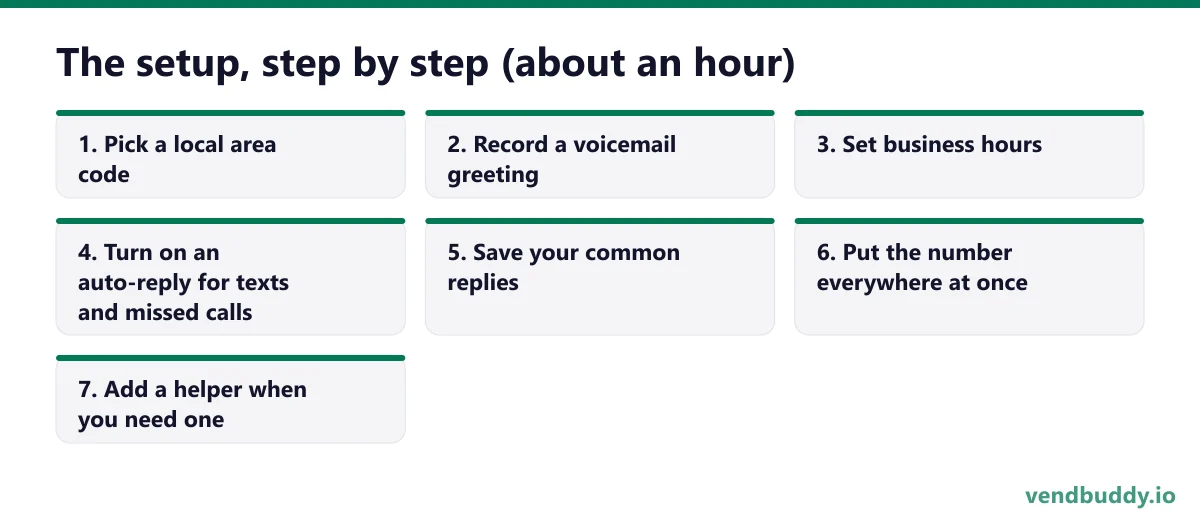
- Pick a local area code. A local number looks like a neighbor, and property managers return local calls faster than toll-free ones.
- Record a voicemail greeting. Say the business name, say that texting is the fastest way to reach you, and say when you reply. The script is in the templates below.
- Set business hours. Decide when the phone rings and when it goes to voicemail. Most operators pick their route hours plus a short evening window.
- Turn on an auto-reply for texts and missed calls. Customers mostly want to know someone saw the message. A 10-second auto-reply does that while you are in a loading dock.
- Save your common replies. Refund, out-of-order, restock request and follow-up. Copy the templates below into your saved replies.
- Put the number everywhere at once. Machine stickers, your one-pager, your Google Business Profile, your email signature and your invoices. One number, the same everywhere.
- Add a helper when you need one. On a shared line, everyone sees the same conversation, so a refund text does not get answered twice or not at all.
What to put on the machine sticker
Keep it short enough to read from three feet away. Operators who put an owner name and phone on the machine say it cuts down "machine ate my dollar" anger, because people can see a real person is behind it. The wording that works:
Problem with this machine? Text or call for a refund or service: (555) 010-0000. Locally owned by [Business Name].
Say "text" first. Most people would rather text than call, and a text gives you the slot number and the amount in writing. If you use a QR code too, point it at a simple refund form, and keep the phone number next to it for people who will not scan anything. More cheap fixes like this are in 10 small touches that quietly boost vending sales.
Copy-paste text templates for operators
These are the texts that come up every week. Change the names and numbers, keep them short, and save them as quick replies. Short and fast beats long and perfect.
1. Refund request, first reply
Hi, this is [Name] with [Business]. Sorry the machine gave you trouble. Which machine (building and floor), which slot, and how much did you lose? I’ll make it right today.
Ask for the slot every time. Three refunds from the same slot is a jammed spiral telling you where to look.
2. Refund sent
Done, I just sent $[amount] back to you by [Venmo/Zelle/card refund]. Thanks for telling me. It helps me fix the machine before it happens to someone else.
3. Machine out of order
Thanks for the heads up. I’ve got the [machine] on [floor] on my list and I’ll be there by [day/time]. If you lost money, reply with the amount and I’ll refund it today.
4. Property manager follow-up after a walk-in
Hi [Name], this is [Your name] with [Business]. Thanks for the few minutes today. As promised, I’ll drop off the one-pager for the [break room/lobby] spot. Is Thursday morning or Friday afternoon better for a 10-minute look?
Send it the same day. The scripts for the walk-in itself are in the vending machine cold pitch script.
5. Follow-up after no reply
Hi [Name], [Your name] with [Business] again. No rush at all. Should I check back after the first of the month, or should I leave this one alone?
This permission-to-close line is the one that most often gets an answer. The full five-touch cadence is in how to cold call vending machine locations.
6. Property manager restock or product request
Got it, thanks [Name]. I’ll add [product] on my next service on [day]. If it sells, it stays. If anything else is missing that residents ask about, just text me here.
7. Service visit heads-up for the property
Hi [Name], quick heads up: I’ll be at [building] on [day] around [time] to restock and service the machine. Nothing needed from you. Text this number if anything comes up.
8. Monthly check-in with the host
Hi [Name], monthly check-in from [Business]. Machine is running well and fully stocked. Any complaints or requests from your staff or residents? Commission statement is on its way by [date].
This is the text that keeps a placement for years. Most hosts never hear from their vendor until something breaks.
9. Auto-reply while you are on the route
Thanks for texting [Business]. I’m out servicing machines and will reply within [2 hours]. For a refund, send the building, slot and amount and I’ll take care of it today.
10. Voicemail greeting
You’ve reached [Business], local vending service. Texting this number is the fastest way to reach me. For a refund, text the building, slot and amount. Otherwise leave a message and I’ll call you back by end of day.
If you would rather send the first message by email, the written versions are in cold email scripts for vending contracts.
Sharing the line with a helper or driver
For most operators, the first hire is not a full-time employee. It is a spouse who answers texts on Saturdays, or a part-time driver who covers one day a week. That is the moment a shared number pays off. Everyone sees the same thread, so the driver can answer "the machine on floor 2 ate my card" while you are at your kid's game, and you can read later what was said.
Three rules keep it clean:
- One owner per conversation. Whoever replies first owns that customer until it is solved.
- Same saved replies for everyone. The templates above keep the business sounding like one business.
- Refund limit in writing. For example, a helper can refund up to $10 without asking. Above that, they text you first.
When you are ready for that first hire, our guide to hiring a vending route driver covers pay and what to hand off first.
Auto-replies and voicemail transcripts on route day
Route days are where the phone either works for you or eats your day. You are in basements, freight elevators and back hallways with one bar of signal and both hands full of product. Three settings make that easier:
- Auto-reply on missed calls and texts. The caller knows you saw it. You answer at the next stop instead of in the middle of a restock.
- Voicemail transcripts. Read a voicemail in five seconds in the parking lot instead of listening to a two-minute message.
- Business hours. After hours, the phone goes quiet and the auto-reply says when you will be back. That is the whole point of a separate number: the business waits until you are ready.
This is a big part of making a route run without you watching it every minute. The rest of that playbook is in how to make a vending machine business passive.
A second number just for location managers
Once you have a few machines, the sticker number gets noisy. Most of what comes in is refund texts from strangers, which is fine, but it means the property manager who hosts three of your machines is texting into the same pile as someone who lost a dollar in the lobby. That one message matters more than the other twenty.
The fix is a second number that only hosts and prospects get. The sticker number goes on machines. The host line goes on your one-pager, your email signature and your business card, and it is the number you leave when you call a property manager. Now you can treat them differently. The sticker line can sit on an auto-reply all day. The host line can ring you straight through, even on a route day.
On Quo, every extra number is listed at $5 a month and gets its own inbox and settings, so one login covers both. Basic call forwarding to another US or Canadian number is on every plan. Forwarding only the calls you miss, based on your business hours, plus a phone menu ("press 1 for a refund, press 2 if you manage a property") and call transfers sit on the Business plan. A solo operator rarely needs the menu. Two numbers usually do the same job for less.
You can build all of this yourself in a spreadsheet over a weekend. If you would rather not, the operator kits package the same checklists and templates as a one-time download starting at $27.
Texting property managers without getting filtered (10DLC)
If you text from a regular 10-digit business number through an app, US carriers want to know who you are. The system is called A2P 10DLC, and it means registering your business and what you text about with The Campaign Registry, a third party the big carriers chose. Unregistered business texts are the ones that get filtered or never arrive, and you usually do not find out. Quo lists the review at $19.50 one-time and the ongoing carrier fee at $1.50 to $3 a month depending on your use case. Most business texting apps have some version of this step.
Registration gets your texts delivered. It does not make every text a good idea. A few habits keep you on the right side of the carriers and of the people you are texting:
- Text people who gave you their number or asked you to text. A manager who hands you a card and says "text me Thursday" counts. A number you pulled off a directory is a call, not a text.
- Say who you are and which business in the first message, every time you start a new thread.
- If someone replies STOP, stop that day and do not text them again from any number.
- Keep it one to one. A mass blast to fifty property managers is exactly what carrier filters are built to catch, and it reads as spam to the manager too.
Refund replies are easier. The customer texted you first about a machine, so you are answering a question they asked. This is general guidance, not legal advice. If you plan to send marketing texts to lists, read your provider's messaging policy first.
Letting an AI agent answer while you are on the route
The call you miss on a route day is rarely a refund. It is the gym manager who saw your sticker at another gym and wants a machine, and who will call the next operator on the list if nobody picks up. Quo's AI agent, Sona, is aimed at that call. Its product page says it answers inbound calls around the clock, answers questions from the business details you give it (hours, service area, what you offer), takes messages, can transfer the caller to a teammate and can send a scheduling link. It works in English, Spanish or French, but it cannot switch languages partway through a call, and it only answers calls; it does not dial out. Each call it handles comes with a recording and a summary.
For a vending business, the setup we'd suggest is narrow. Give it your service area, the kinds of locations you place machines in, and one job: get the caller's name, the building, how many people work or live there and a good time to call back. For refunds, have it ask for the building, slot and amount, the same three things template 1 above asks for, so the refund is waiting for you in writing.
Watch the math, though. Quo includes 1,000 credits on every plan, which it lists as about 10 calls, and charges $1.00 a call past that on the included $0 AI tier. The next tier is $25 a month for 40 calls. Paying a dollar so a robot can hear about a lost $2.25 is a bad trade. A better split is to keep the sticker number on a text auto-reply and put the agent on the host line, where one answered call can be a new location.
The fastest way to test this in your own ZIP is the . Search once, see which businesses sit within a few miles, and reveal five contacts for nothing. It will not tell you who says yes, but it saves the afternoon you would spend building the list by hand.
Getting call notes into your pipeline
After a five-minute call with a facilities manager you will remember the gist and forget the details: the name of the person who actually signs, the move-in date for the new break room, the competitor whose contract ends in March. That is where AI call summaries earn their keep. Quo writes one for every call on its Business plan (on Starter, only for calls its AI agent answers). Paste the three lines into the notes on that location in your VendBuddy pipeline and you will know exactly what was said the next time you call.
Do not buy a CRM for this. With under twenty locations in play, a pipeline board or a spreadsheet is enough, and the summary is the part that saves you.
Other options and where each one stops
Quo is the paid pick here (we earn a commission on it) because it fits the shape of a vending business: one owner, maybe a helper, lots of texts, calls on the move. It is not the only reasonable choice, and it is not free. Every price below was read from each company's own site on October 11, 2026.
| Option | Listed price | Shared line for a helper | Auto-reply | Texts included |
|---|---|---|---|---|
| Google Voice (personal) | $0 | No, tied to one Google account | Not listed | Unlimited US texting |
| Google Voice for Workspace Starter | $10 per user a month | No ring groups on Starter (they start on Standard, $20) | Not listed | Unlimited US texting, up to 10 users |
| Quo Starter | $15 per user a month billed yearly, $19 monthly | Yes, up to 10 paid users | Yes, texts and missed calls | Unlimited US and Canada (fair use), plus carrier registration |
| RingCentral RingEX Core | $25 per user a month billed yearly, $35 monthly | Shared text inbox is a paid add-on | Not listed | 25 per user a month |
| Grasshopper Solo Plus | $300 a year (about $25 a month), not per user | Yes, one shared inbox, unlimited users | Not listed | Unlimited, plus carrier registration |
"Not listed" means the company's pricing page did not mention it on October 11, not that the feature is missing.
Free Google Voice. The right start for one person with a machine or two. It stops working well when someone else has to answer the same texts, since it lives in one Google account, and it has none of the shared-inbox or AI features above. The longer comparison is in Google Voice alternatives.
Google Voice for Workspace. At $10 per user a month on Starter, it is the cheapest paid line here and the obvious pick if your email and calendar already live in Google.
RingCentral. A full phone system with video meetings and team chat. The 25 texts per user a month on Core are low for a refund line. More in RingCentral alternatives.
Grasshopper. Its Solo Plus plan lists unlimited users on one number for $300 a year, which is cheap if several people share one line; extra numbers are $9 a month each.
Dialpad. Its small business page lists plans from $15 per user a month, with AI call and voicemail transcriptions; it is aimed more at teams than at one operator with a driver.
Aircall. Built for call teams: Essentials lists at $30 per license a month with a three-license minimum, so it does not fit one operator and a driver. See Aircall alternatives.
A second line from your carrier. Many phones can hold two lines, and some carriers sell a second number as an add-on. It keeps the business number off your personal one, but it is still one phone: no shared inbox for a helper, and whatever voicemail your carrier gives you.
Where this fits
A business number is a small thing, but property managers notice it. You are one good location away from this being a real business, and the operator who answers fast, refunds without arguing and checks in once a month is the one who gets the second building. If you are still looking for that first good location, VendBuddy shows you which buildings are worth the walk-in.
Frequently Asked Questions
Should I put my phone number on my vending machine?
Yes, but make it a business number rather than your personal cell. A number on the machine sends refund and service complaints to you instead of to the front desk and the property manager, which protects the placement. A separate number lets you set hours and hand the line to a helper later.
Is Google Voice good enough for a vending business?
For a solo operator with one or two machines, usually yes. A free personal Google Voice number in the US handles calls, texts and voicemail transcripts. It is tied to one Google account, so it does not share well once a helper or driver needs to answer texts with you.
When is a paid business phone app like Quo worth it?
When someone else needs to see and answer the same texts, when you want automatic replies to texts and missed calls on route days, or when you send the same replies every week and want them saved. Check current plan pricing on the provider site before you sign up.
How should I handle vending machine refund texts?
Reply fast, ask which machine, which slot and how much, and refund the same day without arguing. A disputed two dollars is never worth a location. Log the slot each time, because repeated refunds from one slot point to a mechanical fault.
Can I use a business phone app number for bank login codes?
Often not. Many banks and apps will not send two-factor codes to internet-based numbers. Keep those codes on your personal number and use the business number for customers and locations.
Do I need 10DLC registration to text property managers?
If you text from a regular 10-digit business number through an app, US carriers expect the business to be registered under A2P 10DLC, and unregistered texts can be filtered. Quo lists a $19.50 one-time review fee and a $1.50 to $3 monthly carrier fee. Text only people who gave you their number, identify yourself, and honor STOP.
Can an AI agent answer my vending business phone?
Yes. Quo's Sona agent answers inbound calls, answers questions from details you give it, takes messages and can transfer calls. Every Quo plan includes about 10 agent-handled calls, then $1 a call on the free tier or $25 a month for 40. It pays best on the line property managers call, not the refund line.
What is selling, which buildings say yes, and the numbers before you buy a machine. Free, confirm from your inbox, unsubscribe in one click.
Want the free 26-page Ultimate Vending Guide too? Get the guide
General information, not legal, tax or financial advice. Rules change, so check the official source. Revenue and income figures are examples, not promises. See our terms.