- An automated vending kiosk is any unattended setup where a customer browses, pays and leaves with a product without a cashier: touchscreen machines, smart fridges, wall units and self-checkout kiosks.
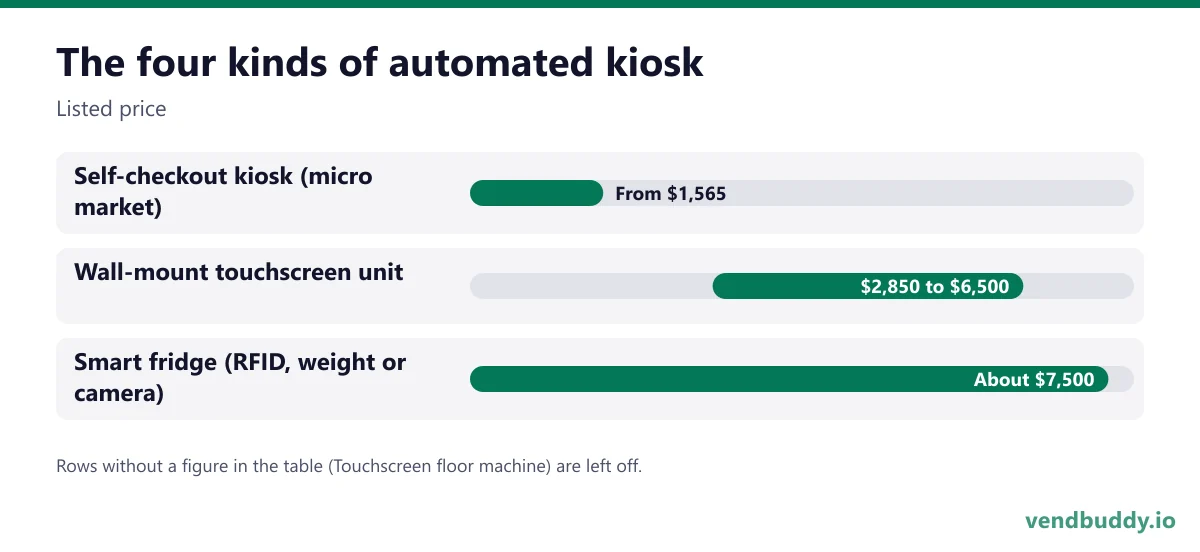
- Prices from real listings: micro market self-checkout kiosks from $1,565, wall-mount touchscreen units $2,850 to $6,500, RFID smart fridges about $7,500 to $8,000.
- Running costs matter as much as the hardware. One smart fridge maker charges $75 a month per unit, $0.25 per transaction plus card fees, and $0.18 per RFID tag.
- Pick by product and trust level: open-door fridges and self-checkout suit secure, known-user spaces; locked touchscreen machines suit public spaces.
- Hardware doesn't make a kiosk profitable. The location and the product mix do.
An automated vending kiosk is retail without a cashier. A customer walks up, picks something, pays with a card or phone, and leaves. That covers a lot of machines: touchscreen vending units, smart fridges you open and take from, slim wall units, and self-checkout kiosks in micro markets. The word gets used loosely, so this guide sorts the four types, gives real prices for each, and explains how to choose one based on the location instead of the sales video.
Part of our complete guide: how to find vending machine locations.
One retail services company draws the line this way: a kiosk is a micro-storefront that lets people browse, select and buy without a cashier in high-traffic unattended spaces (T-ROC). In practice, every option below fits that definition.
The four kinds of automated kiosk
| Type | How it sells | Listed price | Best fit |
|---|---|---|---|
| Self-checkout kiosk (micro market) | Open shelves and coolers, customer scans and pays at a kiosk | From $1,565 for the kiosk (Vending.com) | Offices and secure workplaces with 100+ people |
| Wall-mount touchscreen unit | Locked coils, touchscreen, cashless | $2,850 to $6,500 (VTM, DMVI) | Bars, gyms, hotels, small spaces |
| Smart fridge (RFID, weight or camera) | Tap card, door unlocks, take items, charged when the door closes | About $7,500 fridge or cabinet, $8,000 freezer (REDYREF) | Fresh food in offices, hospitals, residential |
| Touchscreen floor machine | Full-size cabinet, screen, coils or robotic picker | Varies widely by size and refrigeration | Public spaces needing larger capacity |
The self-checkout price is the kiosk alone. A micro market also needs shelving, coolers, security cameras and stock, so the full setup costs far more than the kiosk. Our micro market business guide breaks down a full build line by line.
Running costs people forget
Smart kiosks come with software and per-sale fees that a mechanical machine never had. REDYREF publishes its numbers clearly, which makes it a good example: a $75 monthly technology fee per unit covering cellular and the dashboard, $0.25 per transaction plus card processing, and $0.18 for every RFID tag you stick on a product. On a fridge selling 400 items a month, the tags alone are $72 and the per-sale fee is $100, before card fees. That's fine on a $9 salad and painful on a $2 soda.
Wall and touchscreen units usually skip tags but carry card fees and often a software or telemetry subscription. Ask every seller for the full monthly cost at your expected volume, in writing.
Picture the machines paying you while you sleep
That’s the real promise of vending — income that doesn’t cost you your time, and a life on your own terms. VendBuddy turns this guide into a step-by-step plan so you actually build it instead of just reading about it. Start free today.
Start building free →Choose by trust level and product
The most useful question isn't "which kiosk is best" but "who walks past it, and what are they buying?"
- Known people, secure building: an office with badge access can run open shelves and a self-checkout kiosk, or a smart fridge. Shrink stays low because people are known.
- Semi-public: apartment amenity rooms, hotel lobbies and hospital waiting areas suit smart fridges and touchscreen units with locked doors.
- Fully public: transit, retail corridors and outdoor spots need locked machines and an outdoor-rated cabinet if exposed.
Then match the product. Fresh food and higher-priced meals favor smart fridges. Small, high-value items favor wall units. Broad snack and drink sales in a public space still favor a full-size machine, often a traditional one with a card reader. Our smart vs traditional comparison lays out that choice in detail.
Kiosks inside micro markets
A micro market is the biggest version of an automated kiosk: a small store in a break room with a self-checkout station. It works when there are enough people to justify the shelves and coolers, usually a large office or a facility with more than one shift. Our micro markets vs vending machines guide covers the headcount and setup costs, and is a smart cooler worth it as a first machine covers the single-fridge version.
How to pitch one to a location
Kiosks are easier to sell to a property manager than a plain vending machine because they look like an amenity. Lead with what the location gets: fresh food or a wider choice without hiring anyone, card-only payment, no cash to manage, and a clean look. Bring a photo of the exact unit and its size. Wall units often get a yes where floor machines don't, since they take no floor space; see the wall mounted vending machine guide.
Ten questions to ask any kiosk seller
Kiosk sellers are good at demos. These questions get you the numbers that decide whether the unit makes money:
- What's the all-in monthly cost at my volume? Ask for software, connectivity, per-transaction and card fees added together for, say, 300 and 1,000 sales a month.
- Who owns the customer data and the sales reports? You want exports you can take with you if you switch platforms.
- What happens when the connection drops? Some units stop selling offline; others queue transactions. Know which before you put one in a basement.
- How are disputes and refunds handled? Smart fridges charge after the door closes, so a customer who disagrees with the charge needs a fast path, or the location hears about it.
- What's the warranty, and who does the repair? A one-year parts warranty is common; labor and shipping often aren't covered.
- How long is the lead time? Popular units can be weeks out, and a location that said yes in March can go cold by May.
- Can the cabinet be branded for the location? Property managers like a unit that matches their space, and it helps you win the placement.
- What does shrink look like on open-door units? Ask for typical loss rates in offices versus public spaces, and what the camera or weight system catches.
- Is there a contract or minimum term on the software? Monthly fees with a multi-year commitment change the math.
- Can I see a live unit at an operator's location? A unit running in the real world tells you more than any video.
Write the answers down next to each other. The cheapest hardware is often the most expensive kiosk once two years of fees are added up.
Common mistakes with automated kiosks
The first is buying the technology before the location. A $7,500 fridge sitting in your garage while you look for a building is the most expensive way to start. The second is putting a smart fridge in a public space where nobody is accountable, then blaming the fridge for losses. The third is pricing like a vending machine: fresh food in a smart fridge has to carry the per-sale fees and the spoilage, so price it like a café, not like a can of soda. The fourth is ignoring restocking. A kiosk that shows empty shelves on a touchscreen looks worse than a half-empty machine, because the screen tells everyone what you don't have.
The bottom line
An automated kiosk is a tool, not a business plan. The hardware ranges from a $1,565 self-checkout kiosk to an $8,000 smart freezer, and the fees range from almost nothing to a meaningful share of every sale. Choose the location and the product first, then the kiosk that fits both.
If you're still looking for that location, VendBuddy shows you which businesses near you are worth the walk-in.
Frequently Asked Questions
What is an automated vending kiosk?
Any unattended retail setup where customers choose, pay and take a product without a cashier. Common types are micro market self-checkout kiosks, wall-mount touchscreen units, smart fridges and touchscreen vending machines.
How much does an automated vending kiosk cost?
From real listings: micro market self-checkout kiosks from $1,565, wall-mount touchscreen units $2,850 to $6,500, and RFID smart fridges about $7,500 to $8,000, plus any software and per-transaction fees.
What are the monthly costs of a smart fridge kiosk?
It depends on the vendor. REDYREF, for example, lists a $75 monthly fee per unit, $0.25 per transaction plus card fees, and $0.18 per RFID tag.
Is a smart fridge or a vending machine better?
A smart fridge suits fresh food and higher-priced items in buildings where people are known. A traditional or touchscreen vending machine suits public spaces and lower-priced snacks and drinks.
Do automated kiosks take cash?
Most don't. They're card and mobile-wallet only, which removes cash handling but means you need a reliable connection and pay card fees on every sale.
What is selling, which buildings say yes, and the numbers before you buy a machine. Free, confirm from your inbox, unsubscribe in one click. Refer one friend and get 25 VendBuddy credits.
General information, not legal, tax or financial advice. Rules change, so check the official source. Revenue and income figures are examples, not promises. See our terms.