Part of our complete guide: how to start a vending machine business.
The most referenced question in every vending operator community is some version of "what do I actually need for install day?" Here is the complete checklist — tools, gear, pre-install steps, and the post-install sequence that gets your machine from delivery truck to first sale in a single day.
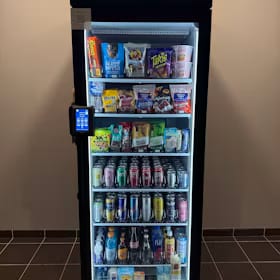
Everything below assumes a solo installation of a smart AI cooler (280–320 lbs) into an apartment lobby, office break room, or similar indoor commercial space. For traditional coil machines or installations requiring freight delivery into upper floors, adjust accordingly. The solo moving guide covers the physical maneuvering in detail.
Pre-install: the week before
- Confirm electrical: dedicated 20-amp circuit within 6 feet of the planned machine position. Test with a circuit tester before install day.
- Measure the doorways, hallways, and elevator dimensions the machine must pass through. A HAHA Smart Combo is approximately 35" wide — most standard doorways (36") clear by one inch. That one inch matters.
- File your COI (certificate of insurance) with the property manager. No COI, no install — most commercial properties require it.
- Confirm the machine delivery window and ensure someone (you or a contact) is at the property to receive it.
- Schedule a 30-minute call with machine manufacturer support (HAHA, Cantaloupe, etc.) to pre-activate the unit and confirm it's not in Demo Mode.
- Prepare your planogram list: the products you'll stock, their prices, and the order they'll appear in the AI training sequence.
The install day tool kit
Primary moving equipment:
- Strongway 1,200 lb Industrial Hand Truck ($300): The only dolly rated and built for moving a full-size smart cooler solo. Stair-climbing rear wheels, auto-recoil ratchet strap. Buy here →
- Furniture sliders (4-pack, $12): For sliding the machine into final position on level floors once it's off the dolly. Prevents floor scratches and makes micro-positioning easy.
On-site tools:
- Socket set (3/8" drive, metric and standard) for any mounting hardware
- Level (the machine must be level for proper cooling and door alignment)
- Tape measure (verify final position against planogram)
- Extension cord (18-gauge minimum, 10-foot max) for temporary use if the outlet isn't exactly where you need it — permanent use requires the circuit at the right position
- Contractor garbage bags (for packaging material disposal)
- Collapsible totes for first-restock inventory transport from your vehicle
- Clear plastic bins for staging inventory during the initial stock
Documentation and monitoring:
- Scotch Thermal Laminator TL901X ($46): Laminate your service contract and location agreement the morning of install. Hand the PM a professional-looking document. Buy here →
- WYZE Cam OG 2-pack ($58): Mount one at the machine position before you leave. If anything goes wrong in the first 72 hours, you have footage. Buy here →
Picture the machines paying you while you sleep
That’s the real promise of vending — income that doesn’t cost you your time, and a life on your own terms. VendBuddy turns this guide into a step-by-step plan so you actually build it instead of just reading about it. Start free today.
Start building free →The install day sequence
- Arrive 30 minutes early. Meet the PM, confirm machine position, confirm electrical access.
- Unbox at delivery location (lobby entrance, loading dock) — never unbox in the vehicle. Remove all packaging, inspect for shipping damage, photograph any damage before signing the delivery receipt.
- Dolly to final position. Tilt to 30° maximum. Keep strap tight. Two-person preferred for narrow hallways — solo is doable with the Strongway in open spaces.
- Level the machine. Adjust leveling feet until a level reads flat in both directions. This takes 5–10 minutes and matters for door seals and cooling performance.
- Connect power and wait for boot sequence to complete (2–4 minutes for most units).
- Confirm connectivity: cellular and/or WiFi signal showing in operator dashboard. If not showing, troubleshoot before stocking (see connectivity troubleshooting).
- AI product training: 60–90 minutes for a full planogram on HAHA. Work through your product list systematically — photograph each item from 2–3 angles as the interface directs.
- Stock the machine. Load per planogram. Set prices in the software interface for each SKU.
- Mount your WYZE cam, connect to the lobby WiFi (get password from PM), confirm video feed in the app.
- Sign the service agreement with the PM. Hand them the laminated copy.
- First test transaction. Buy one item yourself to confirm end-to-end payment and AI recognition.
FAQ
How long does a solo vending machine installation take?
Plan for a full day: 1–2 hours for delivery and positioning, 60–90 minutes for AI product training, 30–45 minutes for stocking, and buffer time for unexpected issues (connectivity, scheduling). Experienced operators who have done 5+ installs get the total down to 3–4 hours.
Do you need a certificate of insurance to install a vending machine?
Almost always for commercial placements (offices, apartment buildings, warehouses). Most commercial properties require a COI naming them as additional insured before allowing any vendor installation. File it with the PM a week before install day. See the vending insurance guide for how to obtain one affordably.
What is Demo Mode in a vending machine?
A default configuration on some smart AI machines (notably HAHA) where the machine dispenses products without charging. This exists for product demos and tradeshow use. If you stock and run the machine without disabling Demo Mode first, every purchase is free. Call manufacturer support to disable it before your first restock. Takes 5–10 minutes and is a one-time step.
Related: how to move a vending machine solo, connectivity troubleshooting, vending machine insurance guide, what nobody tells you about your first machine, starting with an Amazon machine.